

It’s tempting to crank every AI task up to the biggest model on the highest reasoning setting. More thinking has to mean better results, right?
Sometimes. But you pay for every one of those thinking tokens, and for a lot of tasks you’re paying for accuracy you don’t actually need.
I ran into this while building an AI agent. The idea is simple: give it a video, pull out every claim made in it, spoken or shown on screen, so each one can be fact-checked. The video analysis skill sends the video to Gemini and gets back a timestamped transcript, the claims, and the charts, labels and animations tied to each claim, down to the frame.
That last part matters. If a claim is backed up by a graphic, I want to point at the exact moment it shows up.
So I wanted to know how much accuracy I was trading for how much less cost. I took a short 36-second educational clip about aquifers, ran it through three configurations, three times each, and checked every answer against the actual video.
Here’s what I’ll go through:
- Why I picked Gemini for video understanding
- What happened when I switched to the cheap model
- How I measured accuracy (and why I didn't trust the model's own output)
- Deep vs Lite: the cost vs accuracy trade-off
- Why you should run things more than once
- How I coordinated Claude Code to do the measuring
- How I set up two depth levels, Deep and Lite, in my Gemini video skill
Table of Contents
Why Gemini for Video Understanding
I went with Gemini’s video understanding for a few reasons:
- It does well. It handles the speech, the on-screen text and the visuals in one pass, and it can go back and inspect frames more closely when it needs to.
- It's straightforward to use. You hand it a video and a prompt and get structured JSON back. No stitching together a speech-to-text service, an OCR service and a frame extractor yourself.
- It runs on Google's infrastructure. The heavy lifting of processing the video happens on Google's side, not my machine.
- It fits a lot of use cases. Pretty much anything that involves analyzing what's said and shown in a video: fact-checking, summarizing, finding key moments.
- It takes YouTube URLs directly. For a public YouTube video I just pass the link. No downloading it first.
That last one is EXTREMELY USEFUL for fact-checking, since that’s where most of the videos I’d want to check live.
What the Analysis Looks Like
Before getting into the comparison, here’s what the Deep analysis gives back. I had Claude Code render the skill’s JSON output into an HTML report so it’s easier to review.
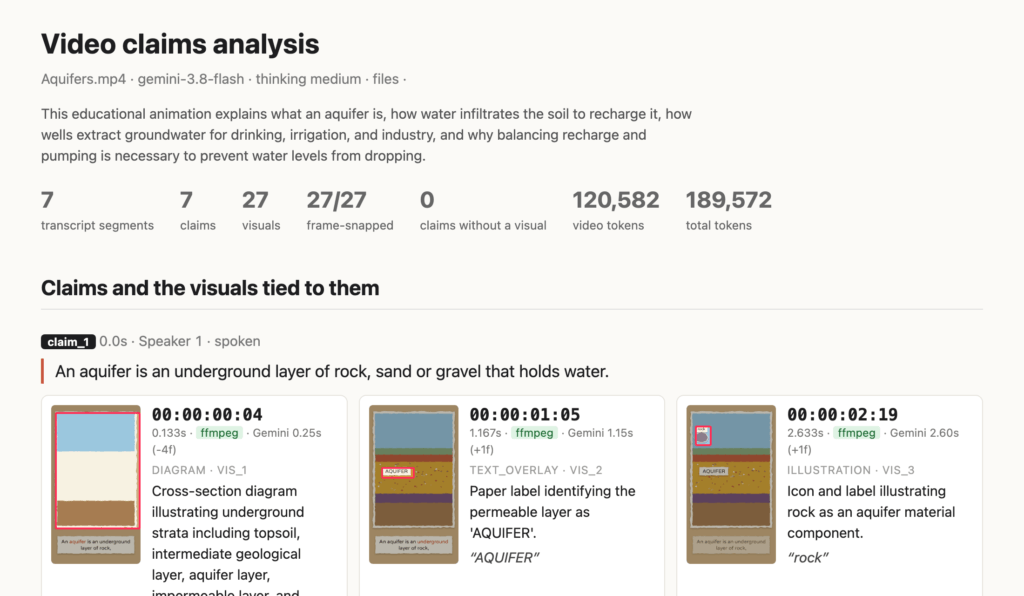
It goes through the video claim by claim. Each claim gets its exact quote, who said it and when. Under it are the visuals that back it up, each with its own timecode, a red box around the element on the frame, and what’s written on screen.
Notice the green ffmpeg tag. Gemini estimates when an element appears, then the skill snaps that estimate to the exact frame where the pixels inside the box change. The Gemini estimate is still shown next to it so you can compare.
Here’s the next claim:
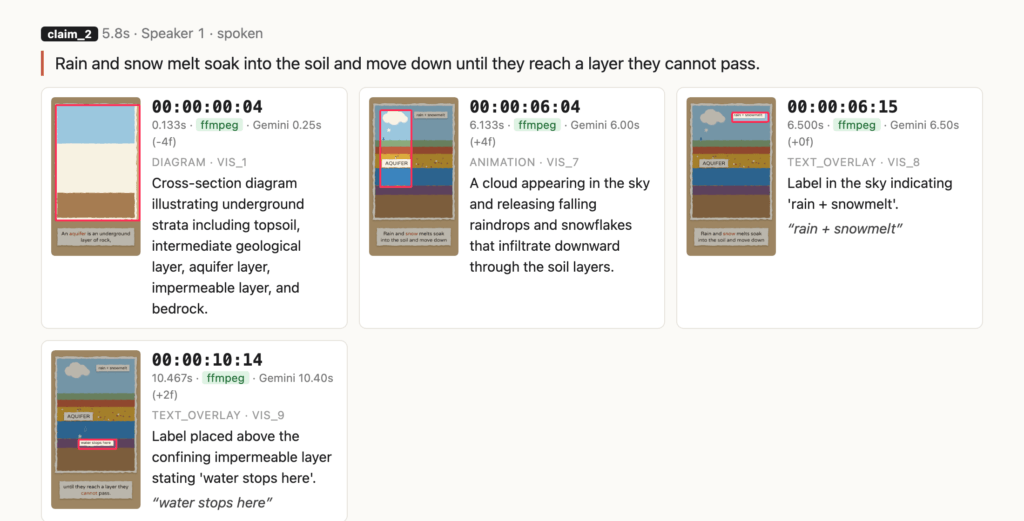
One spoken sentence, four visuals: the diagram, the cloud animation, and two labels, each pinned to its own frame. That’s the level of detail I want when fact-checking.
The Cheap Model That Barely Watched the Video
My first version used Gemini 3.8 Flash at its default medium thinking level. It worked well, but I wanted something cheaper for quick passes, so I tried Gemini 3.5 Flash-Lite.
It came back in about 25 seconds instead of about 2 minutes 20, and cost about 16 times less (around $0.008 a run vs $0.124). Then I looked at what it actually did.
It barely watched the video. Every run loaded exactly 2,376 video tokens, compared to 117k to 166k for 3.8 Flash. Yet its transcript was still word for word, so the speech came through fine. It just didn’t spend much on looking at the frames. Instead of 26 or 27 separate visual elements it gave me 5 to 9 entries, most of them whole scenes lumped together.
What gives!?
So I asked Claude Code to check Google’s docs for any prompting guidance specific to Flash-Lite. There isn’t any. The difference was a setting. 3.8 Flash defaults to thinking level medium. Flash-Lite defaults to minimal, which Google recommends leaving alone “for maximum throughput” on things like extraction and classification.
In other words, the default is tuned for a completely different job than mine. Bumping Flash-Lite to high thinking got it reading the on-screen text again. It didn’t make it as good as 3.8 Flash, though, and that’s the part worth measuring.
How I Measured It
I didn’t want the models graded against each other, because then the “best” model becomes the answer key by default. So the ground truth had to come from the video itself:
-
Speech: ffmpeg's
silencedetectfinds where each sentence really starts and ends. That's good to about a tenth of a second. - Visuals: a frame-by-frame pass through the 36-second clip, noting when each of 27 visual elements first appears: labels like "AQUIFER" and "pumping out", icons, arrows, the water filling the aquifer.
Then a small script scores each run. For every visual a run reports, it checks whether the timestamp lands within 2 frames of the real onset. At 30 fps, a frame is 33 milliseconds, so this is a strict test.
All runs used the same clip, and each configuration ran three times:
- Deep: Gemini 3.8 Flash, medium thinking
- Lite: Gemini 3.5 Flash-Lite, high thinking
- Lite minimal: Gemini 3.5 Flash-Lite, minimal thinking (the model's default)
NOTE: Costs are estimated from each run's token counts using Google's published rates, not my billing statement. I'm assuming tool-use tokens bill at the input rate, which Google doesn't document.
How I Coordinated the Work
To be clear, I didn’t do the frame-by-frame checking or write the scoring script myself. Claude Code, running Opus 5.5, did that. My job was steering it toward a specific goal and keeping it honest.
Here’s roughly how that went:
- Start with the question, not the task. 'Compare the quality of the Gemini Flash 3.5 lite output to see if it missed things 3.8 Flash caught. Also compare the costs.' Then later: "How much accuracy was traded for how much less in cost?"
- Raise the bar when the answer isn't good enough. One run per configuration felt thin, so I asked for two more of each "to see how big of a variance there is between runs," then a quality check against ALL the runs, including the accuracy of the timestamps.
- Gate the things that cost money. Every live Gemini run needed my go-ahead first.
- Question the claims. When something sounded like a conclusion rather than a measurement, I asked if it was accurate. More than once, it wasn't fully backed by the data, and it got corrected.
The agent did the grinding. I decided what “good enough” meant and when to push for more evidence.
Deep vs Lite: What You Get for the Money
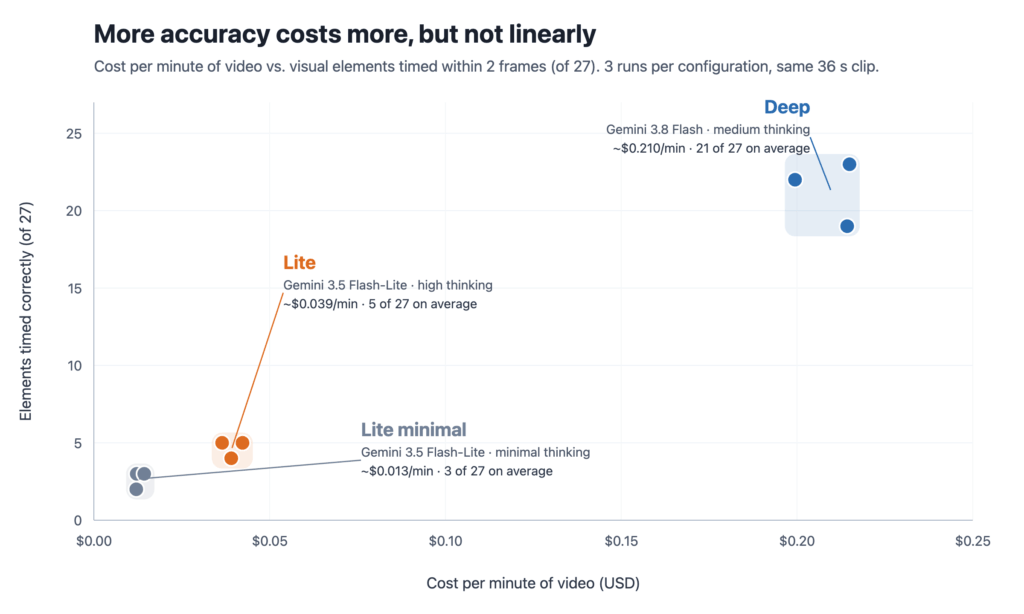
Notice 3 things:
- Deep costs about $0.21 per minute of video and gets 19 to 23 of the 27 elements frame-accurate.
- Lite costs about $0.04 per minute, roughly 5 times cheaper, but only times 4 or 5 elements correctly.
- Lite minimal is about $0.013 per minute and gets 2 or 3.
That looks like a blowout for Deep. But it depends on what you’re asking for.
So I looked at what each one actually found. Two behaviors stood out.
Lite finds the claims and the on-screen text reliably, but loses per-element timing. At high thinking it found every claim in every run, and 17 or 18 of the 18 on-screen labels. The words were all there. What it didn’t do was give each element its own timestamp. It lumped “drinking / irrigation / industry” into one entry with one time, even though those three icons show up at 20.6, 21.2 and 22.1 seconds. Two of its timestamps were just copied from when the narrator started talking.
Here’s the same claim from both side by side:
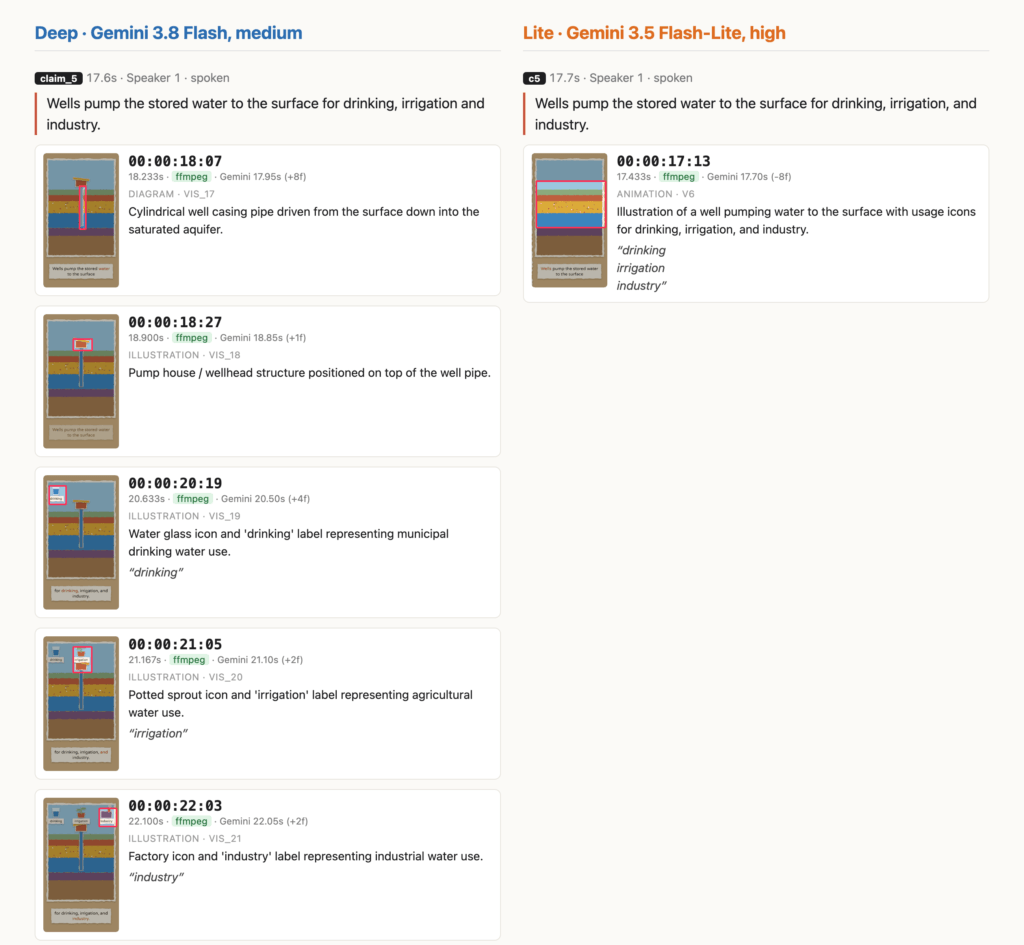
Deep gives the well, the pump house and each of the three icons their own card, timecode and box. Lite gives one card covering the whole scene, with all three labels stuffed into it and one time that’s actually when the scene starts.
Lite is unreliable on purely visual evidence. The clip has 9 visuals with no text on them: the cross-section diagram, the water rising into the aquifer, the rain cloud, the zoomed-in sand grains, the droplets filling the gaps, the recharge arrows, the well, the pump house and the measuring gauge. Deep mentioned 8 or 9 of them in every run. Lite at high thinking mentioned 5, then 4, then only 2. Lite minimal mentioned 3 or 4.
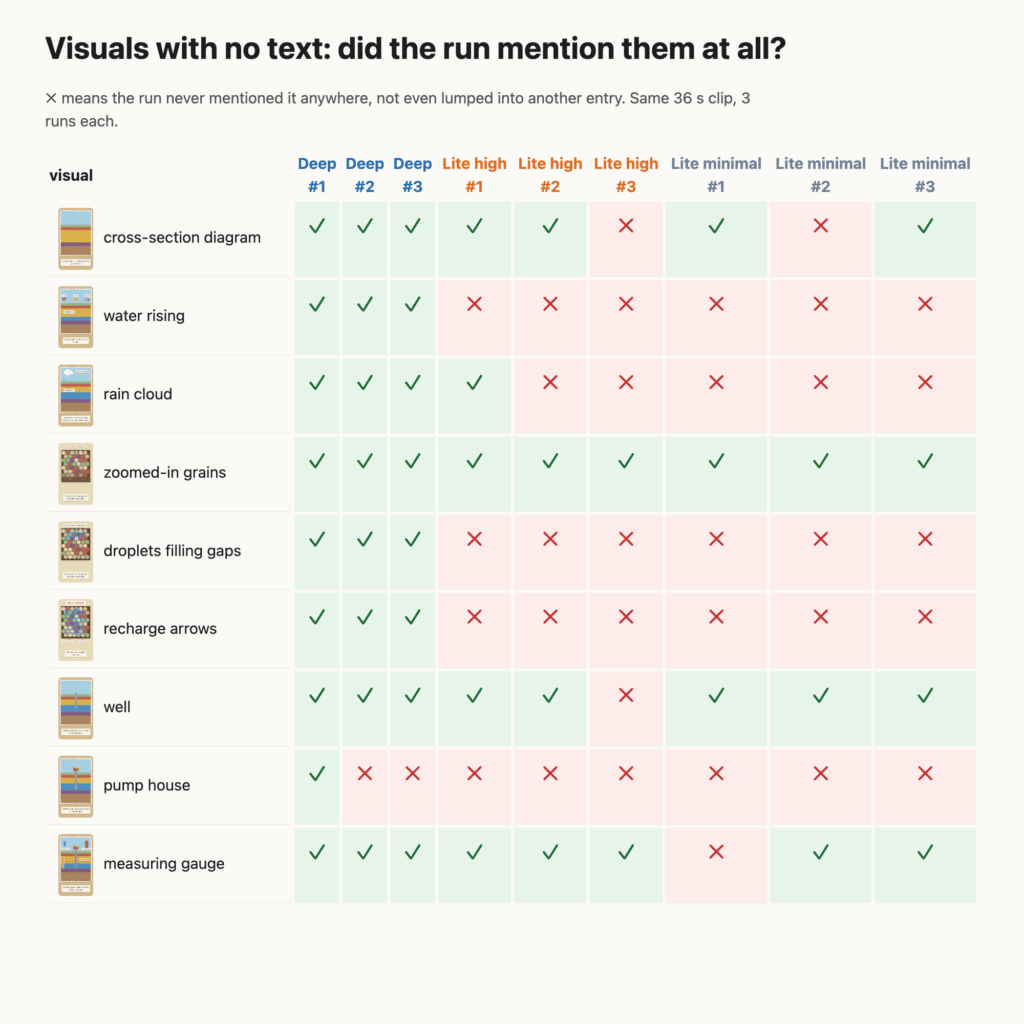
Those aren’t lumped into something else. They’re just gone. A ✗ means the run didn’t mention that visual anywhere in its output, not even buried inside another entry. Look at the droplets filling the gaps between the sand grains. That’s the visual for “The water fills the spaces between the grains.” Deep caught it in all three runs. None of the six Lite runs ever mentioned it.
Now think about what that means for fact-checking. If a claim is backed up by a labeled chart, Lite will probably catch the label. If it’s backed up by an animation with no text, like water filling the gaps between sand grains, Lite may never tell you it was there.
So the job splits in two. Pulling out the claims and the on-screen text so you know WHAT to check? Lite gets you most of the way for a fraction of the cost. Pointing at the exact frame where the visual evidence for a claim appears, or catching evidence that has no text at all? You need Deep.
And you only find this out by trying different models and reasoning levels against the same video. Each configuration’s output looked complete on its own. Lined up side by side against the actual video, it clearly wasn’t.
Different question, different tool.
Run It More Than Once
This is the part that surprised me most.
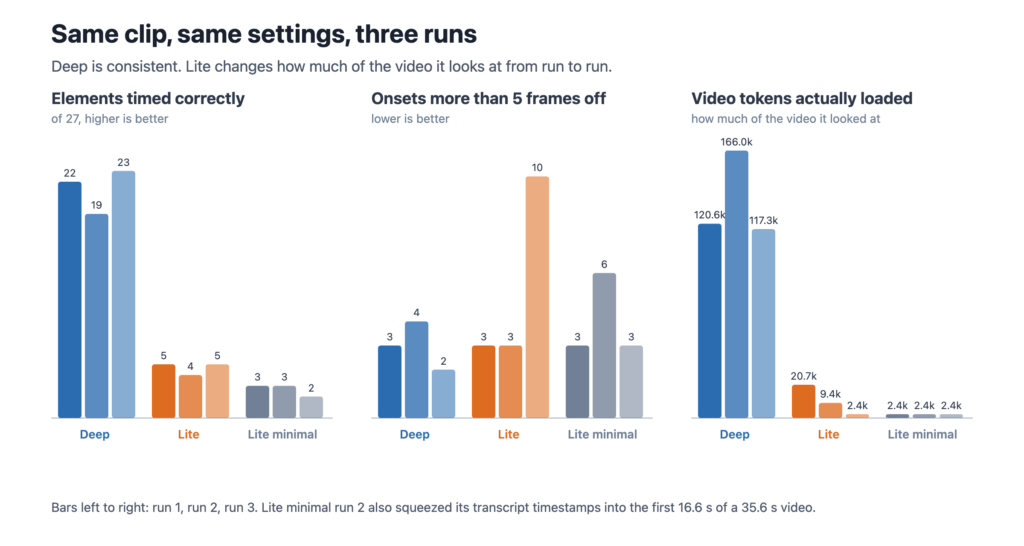
Deep was consistent. All 18 labels every run, 19 to 23 elements frame-accurate, and the cost within about 8% across runs.
Lite was NOT consistent. Same clip, same settings:
- Runs 1 and 2 loaded 20.7k and 9.4k video tokens and gave me tidy scene-level summaries.
- Run 3 loaded 2.4k video tokens, the same as minimal thinking, and gave me 18 separate entries. 10 of them were more than 5 frames off.
So high thinking doesn’t guarantee the model actually looks at the video. And a run that lists MORE visuals can be LESS accurate.
Lite minimal had the scariest failure. In run 2 it squeezed all seven sentences of the transcript into the first 16.6 seconds of a 35.6 second video. The text was right, the timestamps were garbage, and nothing about the output looked broken. If you’re fact-checking and citing timestamps, that’s how you end up quoting someone at the wrong moment.
If I’d only run each configuration once, I would’ve drawn the wrong conclusions about Lite.
Deep Isn't Perfect Either
Deep’s misses were interesting because they repeated. It was 5 frames early on the “AQUIFER” label in all three runs, and 6 frames early on the “pumping out” arrow in all three.
The cause wasn’t Gemini. My skill has a step that snaps Gemini’s estimated time to the exact frame where the pixels inside the element’s box change. When another animation happens inside or near that box, the snap grabs the wrong change. For the misses in the first Deep run, Gemini’s own estimate was within 2 to 5 frames of the real onset. The “correction” made it worse.
So running Deep twice and averaging wouldn’t help here. It’s wrong the same way every time.
Two Depth Levels Instead of One Setting
So here’s how I set it up. My Gemini video understanding skill, analyze-video, pulls out the transcript, claims and visuals for fact-checking. Instead of one model on max reasoning for everything, it takes a --depth option with two precision levels:
- Lite (default): Gemini 3.5 Flash-Lite at high thinking. Good for a general pass: the transcript, the claims, the on-screen text. Roughly $2.40 for an hour of video.
- Deep: Gemini 3.8 Flash at medium thinking. For when frame-accurate timestamps and every visual element matter. Roughly $12.60 for an hour of video.
The skill tells you which depth it’s running before every analysis. If you say you’re checking whether a video is factually accurate, it proposes Deep and warns you it costs about 5 times more. It never switches depth silently.
NOTE: Those per-hour numbers are extrapolated from the 36-second clip only. I haven't analyzed a long video yet, so actual costs, and accuracy, on longer videos may be quite different. Google's docs say agentic video processing saves the most on long videos, so the real per-minute cost could come out lower.
Wrapping It All Up
There’s always a compromise. I cannot stress this enough.
More reasoning isn’t automatically better. It’s more expensive, and sometimes it buys accuracy your task doesn’t need. Figure out what the job actually requires, measure the cheaper option against real ground truth, and run it more than once before you trust it. For fact-checking videos, that means a cheap pass to find the claims, and a deep pass when you need frame-accurate evidence.
Right model, right reasoning level, right job.
I hope this helps you avoid paying Deep prices for Lite jobs, or worse, trusting Lite output for a Deep job.
If you liked this article you might also like Custom Claude Code Hooks
Notifying You for Attention.